
Trackidz Parental Controls1.97 - Google Play
You'll be able to see results in few seconds.
Publisher Description
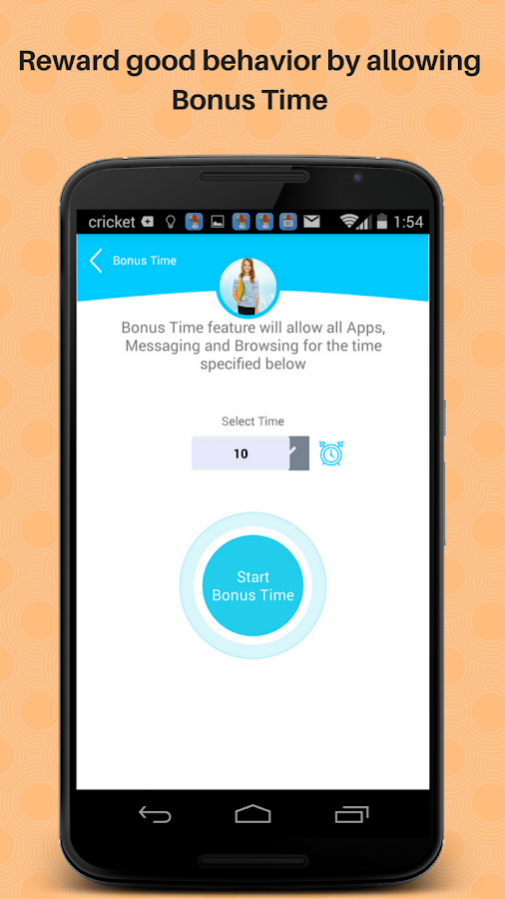
Trackidz offers a wide range of Screen Time control & monitoring features for parents of our Little Geniuses. It also offers ground breaking personal safety features for pre-teens and teens.
*** Covered by Common Sense Media
Trackidz is a set of 2 Apps. Trackidz Parental Controls is installed on the Parent's device and Trackidz Child is installed on the Child's device.
Trackidz Child can be downloaded from here: https://goo.gl/EvhRYS
If you want to reach out to us please contact us at support@cresoltech.com
Screen Time Control
--> Are your kids spending too much time on their phones or tablets?
--> Are your kids addicted to a few games or apps and you want to control the usage of those specific apps?
--> Are your kids using their phones or tablets past bed time or during Dinner time?
--> Are your kids using some inappropriate apps and you want to block them?
--> Do you wish to reward your kids for good behavior with some Bonus screen time?
If you answered yes to any or all of the above questions, then Trackidz has the answer for you. With features like Max Time, Daily Apps Time, Lock Apps, Lock Schedule, Bonus Time and Timeout, it takes care of all your woes to control your child’s screen time.
Monitor
--> Do you want to keep track of what they are doing on their devices from the comfort of your own device?
--> Do you want to monitor all the web pages that your child visited on Chrome this week?
--> Do you want to monitor all new apps downloaded?
--> Are you concerned about your child’s friends and want to monitor his/her contacts?
The “Monitor” menu in Trackidz takes care of all the above questions and then more.
Safe Browsing
--> Are you concerned and want to control what your child browses?
The Parent's Preferred Browser feature allows parents to assign one browser of their choice as their preferred browser and Trackidz then blocks all other browsers. So you can download any free or paid safe browser and assign it as Parent's preferred browser in Trackidz.
Safety
Are you worried about the whereabouts and safety of your teen or pre-teen?
The Location and Geo Fence feature helps you keep track of your child's location.
Every pre-teen or teen is a potential target for cyber bullies. With Cyber Bullying on the rise, how will you know if it happens to your child?
Trackidz's ground breaking feature on cyber bullying uses your child's weekly data to detect if he/she is being cyber-bullied. More info on www.trackidz.com
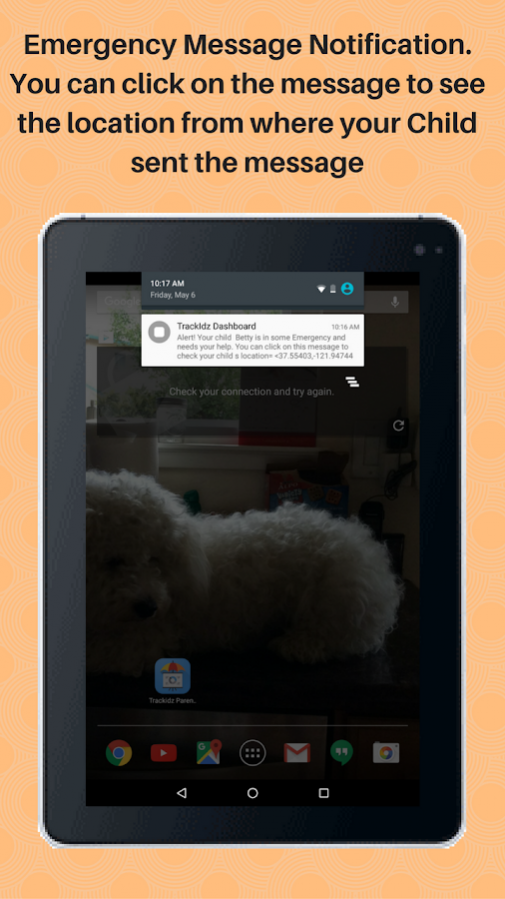
The "Emergency Message” feature is aimed at helping parents deal with any situation if your child is in some Emergency.
If your child is in an Emergency situation, a few taps on the power button will send an Alert Message to parents. Parents can tap on the message to see the location from where the message was sent. The child does not even need to take the phone out from his/her pocket to trigger the Emergency Alert Message.
Similarly the "Phone-Off Alert" feature sends an Alert message to parents if the child's phone is powered off. Parents can tap on the message to see the location from where the message was sent.
Please follow the below steps to signup
1. Open 'Trackidz Child' App on your child's device and click on "New User"
2. Sign up from the next screen by providing your Child's name, your email Id and a new Password. That's it. There is nothing more to be done in Trackidz Child App after the sign-up.
3. Open Trackidz Parental Controls on your device and proceed to the log-in screen by answering Yes to the first two questions. Log-in using the same email ID and password used during sign-up.
4. You should now see "My Kids" screen with your child's name on it. You can click on your child's name to proceed to the Main menu and start using Trackidz.
***************************************************
Website: http://www.trackidz.com
Facebook: https://www.facebook.com/trackidz
**************************************************
About Trackidz Parental Controls
The company that develops Trackidz Parental Controls is Cresoltech LLC. The latest version released by its developer is 1.97.
To install Trackidz Parental Controls on your Android device, just click the green Continue To App button above to start the installation process. The app is listed on our website since 2017-12-17 and was downloaded 0 times. We have already checked if the download link is safe, however for your own protection we recommend that you scan the downloaded app with your antivirus. Your antivirus may detect the Trackidz Parental Controls as malware as malware if the download link to com.trackidz is broken.
How to install Trackidz Parental Controls on your Android device:
- Click on the Continue To App button on our website. This will redirect you to Google Play.
- Once the Trackidz Parental Controls is shown in the Google Play listing of your Android device, you can start its download and installation. Tap on the Install button located below the search bar and to the right of the app icon.
- A pop-up window with the permissions required by Trackidz Parental Controls will be shown. Click on Accept to continue the process.
- Trackidz Parental Controls will be downloaded onto your device, displaying a progress. Once the download completes, the installation will start and you'll get a notification after the installation is finished.
Program Details
System requirements
Download information
Pricing
Version History
version 1.97
posted on 2017-12-17
Bug fixes
version 1.86
posted on 2016-08-29
Bug Fix to address display issues for some Foreign Language Apps in the Block Apps Screen.,Some other Bug fixes too.
Disclaimer
Official Google Play Link
We do not host Trackidz Parental Controls on our servers. We did not scan it for viruses, adware, spyware or other type of malware. This app is hosted by Google and passed their terms and conditions to be listed there. We recommend caution when installing it.
The Google Play link for Trackidz Parental Controls is provided to you by apps112.com without any warranties, representations or guarantees of any kind, so access it at your own risk.
If you have questions regarding this particular app contact the publisher directly. For questions about the functionalities of apps112.com contact us.
